

Android 17 is packed with new features that blend artificial intelligence with practical enhancements, aiming to improve productivity, creativity, and everyday usability. Google unveiled the biggest changes during its dedicated Android Show, ahead of the I/O developer conference. From a complete emoji redesign to AI-driven dictation and custom widgets, the update promises to reshape how users interact with their devices. Below is a detailed look at the nine most significant additions coming to Android 17.
All-new emoji
Google has overhauled Android's emoji set — all 4,000 of them. The new emoji adopt a more three-dimensional look, with depth and detail that replace the cartoonish style of previous versions. This marks the first major emoji redesign in years, following trends set by other platforms like Apple and Microsoft. The revamped emoji are expected to arrive on Pixel phones later this year. The update not only refreshes existing emoji but also includes new ones reflecting modern communication needs, such as a head-nodding gesture and a quipu, a traditional Andean knot device used for record-keeping.
Pause Point
Google continues its push for digital well-being with Pause Point, a tool designed to reduce mindless app usage. Users can label certain apps as "distracting." Whenever they try to open a labeled app, a 10-second timer appears, offering breathing exercises or suggestions to open a more productive app. The idea is to give users a moment to reconsider their choice. Pause Point also allows setting session timers, and it introduces enough friction to prevent easy bypass: turning the feature off requires a full phone restart. This feature builds on earlier digital well-being tools like Focus Mode and Wind Down, but adds a moment of reflection before entering potentially addictive apps.
Screen Reactions
For content creators and social media enthusiasts, Screen Reactions simplifies the process of making reaction videos. The feature lets users record video from their selfie camera alongside whatever is on the screen — photos, videos, webpages, and more — all in just a few taps. The user appears as a cutout in front of the onscreen content, eliminating the need for separate recording and editing apps. Screen Reactions launches this summer on Pixel phones first. This tool taps into the growing popularity of reaction content on platforms like TikTok and YouTube, making it easier for anyone to participate without complex software.
Even more AirDrop
Google is expanding the reach of Quick Share, its file-sharing protocol. After making Quick Share interoperable with Apple AirDrop on select Pixel and Galaxy phones late last year, support is now rolling out to phones from Xiaomi, Honor, and OnePlus, joining Oppo and Vivo. For non-compatible devices, Google has introduced a QR code method: users can generate a QR code that iPhone users scan to receive files directly to their iCloud storage. Additionally, later this year, Quick Share and AirDrop support will be integrated directly into apps like WhatsApp. This move aims to bridge the gap between Android and iOS ecosystems, offering seamless file transfers across platforms.
Easier switching from iPhone
Google and Apple have collaborated to simplify the process of switching from an iPhone to an Android device. Apple’s iOS 26.3 introduced support for wireless transfer of files, contacts, messages, homescreen layouts, and eSIMs, but the feature requires an Android 17 device to receive the data. Google says support will finally arrive this year, starting with Pixel and Galaxy phones. This long-anticipated feature addresses a major pain point for users considering a platform switch, making the transition smoother and more complete than before. It also highlights the growing cooperation between the two tech giants in interoperability areas.
Rambler
Rambler is one of several features under Google's "Gemini Intelligence" branding. It is a smart real-time transcription tool that does more than just convert speech to text. Rambler filters out filler words like "um" or "ah," makes speech more concise, and corrects errors. In a demo, Google showed how users could dictate a shopping list and have unwanted items removed automatically — for example, when the speaker changed their mind about bananas, the final list excluded them. Rambler also supports multiple languages within the same message, making it useful for multilingual users. The feature will roll out to the latest Samsung Galaxy and Google Pixel phones this summer. It represents a significant advancement over standard dictation, leveraging AI to understand intent and context rather than just words.
Create My Widget
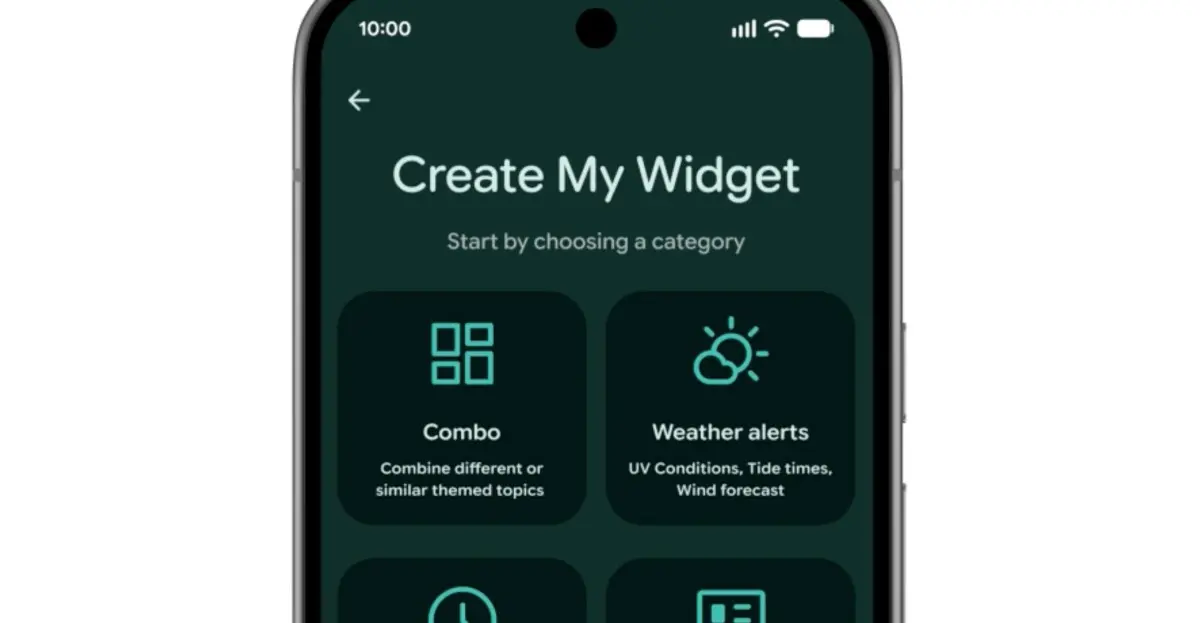
Inspired by Nothing’s vibe-coded Essential App widgets, Google introduces Create My Widget as another Gemini Intelligence feature. This tool allows users to build custom homescreen widgets using natural language descriptions. For example, a user could ask for a meal planner that recommends high-protein recipes, a weather widget for cyclists highlighting wind speed and rain, or a live feed of upcoming shows at a local venue. Create My Widget will be available on select Galaxy and Pixel phones this summer. It democratizes widget creation, making it accessible to non-developers and encouraging personalized home screen setups.
Gemini automation
Alongside Rambler and Create My Widget, Android 17 brings other AI-powered automations. Task Automation, already available for food delivery and rideshare apps on flagship Samsung and Google devices, is expanding to new apps. While Google didn’t specify which apps, it hinted at capabilities like ordering groceries from a shopping list in a notes app or planning a travel itinerary based on a photograph. Additionally, Chrome auto browse will come to Android in late June, bringing AI enhancements to the browser. Gemini will also appear in Autofill to help users complete forms faster. These automations aim to reduce repetitive tasks, using AI to anticipate user needs and actions.
More security features
Android 17 includes a range of security improvements designed to protect users from scams and malware. A new collaboration with certain banks blocks calls that spoof their numbers, provided the user has the bank’s app installed. Improved malware detection analyzes app behavior for suspicious activities like SMS forwarding or background launching. Chrome’s safe browsing mode will now scan app APK downloads for known malware. For theft protection, users can enable biometric protection remotely when marking a phone as lost via Find Hub. Google is also reducing the number of PIN or password attempts allowed while increasing wait times between failures. These updates address growing concerns about mobile security, especially around phishing and device theft.
Android 17 represents a significant evolution of the platform, blending AI innovations with practical usability and security enhancements. The features will roll out gradually, starting with Pixel and Galaxy devices in summer 2026, with broader availability later. As the mobile landscape continues to shift toward smarter, more intuitive interactions, Android 17 positions itself as a forward-thinking update that balances novelty with real-world utility.
Source: The Verge News